

Choosing an Interface
DataVo exposes five ways to query the same embedded engine. They differ in ergonomics and per-call allocation overhead—not in storage modes, durability, or index support—and you can freely mix them in the same process.
Interface Comparison & Trade-offs
All five interfaces execute against the same storage engine, indexes, and MVCC transaction coordinator. Their runtime cost differs strictly by how much SQL parsing, marshaling, and object materialization sits between your C# code and stored row bytes.
| Interface & Packages | Best For | Measured Latency & Heap Allocation | Native AOT | Pros & Cons |
|---|---|---|---|---|
Compiled LINQ (DataVo.Core + DataVo.Generators) | Hot paths: point lookups, filtered scans, aggregates, projections | 55.0 ns / 56 B (InMemory) and 216.2 ns / 144 B (LSM) for PK point lookups over 100k rows; 27.1–89.6 µs / 0 B for compiled Count/Min/Sum/Max over 200k [Columnar] rows (M4 Pro, .NET 10.0.3) | Yes (100% AOT-safe) | Pros: Fastest reads and aggregates; zero-alloc scan kernels; compile-time type safety; .SubscribeInto() zero-GC reactive views. Cons: Requires [DataVoTable] + <InterceptorsNamespaces>; limited to single-table LINQ shapes (use SQL for joins, CTEs, and DDL). |
DataVoContext (DataVo.Core) | Ad-hoc SQL, DDL, prepared statements, vector search, reactive views | 1.2–1.4 µs for prepared-statement PK point reads over 1M LSM rows (db.Prepare(...)). Ad-hoc db.Execute(...) adds SQL lex/parse overhead and materializes Dictionary<string, object?> per row | Yes (100% AOT-safe) | Pros: Full SQL dialect (joins, CTEs, DDL, vector <->/<=>, EXPLAIN, transactions); StreamRef and SubscribeZeroAlloc. Cons: Dictionary-typed results unless paired with [DataVoQuery] or db.Map<T>(row); higher GC pressure on large materialized result sets. |
ADO.NET (DataVo.Data) | Libraries expecting DbConnection, DbCommand, DbDataReader | Not separately microbenchmarked. Wraps DataVoContext prepared and ad-hoc SQL execution with DataVoCommand, DataVoParameter, and DataVoDataReader over System.Data.Common | Yes (100% AOT-safe) | Pros: Standard .NET DbConnection/DbDataReader contract; drop-in for libraries expecting ADO.NET; exposes BeginTransaction(). Cons: More boilerplate than DataVoContext or Compiled LINQ; no DbProviderFactory; lacks DataVo-specific StreamRef/IVM APIs. |
Dapper (DataVo.Data + Dapper) | Plain SQL mapped to POCOs with micro-ORM APIs | Not separately microbenchmarked. Runs over DataVoConnection/DataVoDataReader, adding Dapper's parameter binding and POCO row materialization per returned row | Per Dapper (reflection default; AOT requires Dapper.AOT) | Pros: Minimal boilerplate for plain SQL-to-POCO mapping; familiar API for existing .NET teams. Cons: Extra ADO.NET + Dapper mapping allocations vs. Compiled LINQ; default reflection mapping is not Native AOT clean. |
EF Core Bridge (DataVo.EntityFrameworkCore) | Existing EF Core DbContext models (experimental preview) | Not separately microbenchmarked. Runs EF Core model metadata, LINQ expression-tree inspection, and DbContext entity tracking on top of DataVo.Core | No (excluded from AOT) | Pros: Reuses existing EF Core DbContext entity models and UseDataVo(...) bootstrapping. Cons: Experimental preview; highest per-query overhead and memory footprint; limited LINQ translation vs. relational EF providers. |
Rule of thumb: start with DataVoContext for DDL and general SQL, move hot-path reads and aggregates to Compiled LINQ, use ADO.NET / Dapper when integrating existing SQL codebases, and use the EF Core bridge only when you already depend on EF Core.
Benchmark Grounding
Point-lookup and filtered-aggregate numbers above come directly from the BenchmarkDotNet reports in docs/public/benchmarks/2026-11-21-m4pro/ (Apple M4 Pro, .NET 10.0.3, 02fa240f), and raw prepared-SQL PK lookup latency comes from the 1M-row sql-workload suite in Benchmarks. ADO.NET, Dapper, and EF Core are layered wrappers over DataVo.Core and are not timed separately in the BDN suite.
How Every Interface Connects
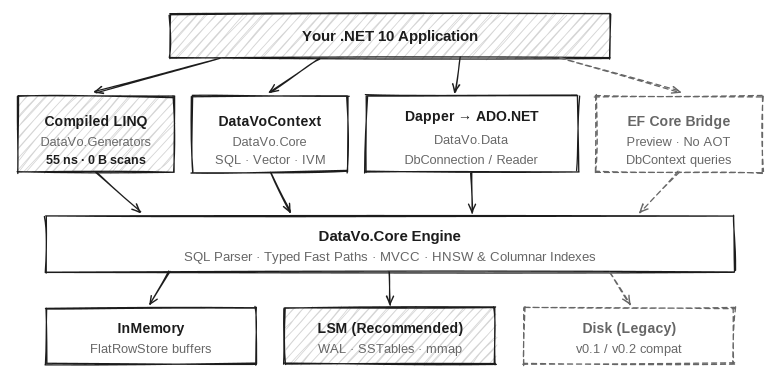
The Same Query, Five Ways
Counting players with Score >= 1000 in the players table:
1. DataVoContext (SQL)
var result = db.Execute("SELECT COUNT(*) AS Total FROM players WHERE Score >= 1000")[0];
object? total = result.Data[0]["Total"];
2. Compiled LINQ (DataVo.Generators)
int total = db.Table<Player>().Where(1000, static (p, min) => p.Score >= min).Count();3. ADO.NET (DataVo.Data)
using var cmd = connection.CreateCommand();
cmd.CommandText = "SELECT COUNT(*) FROM players WHERE Score >= @min";
cmd.Parameters.AddWithValue("@min", 1000);
object? total = cmd.ExecuteScalar();
4. Dapper
int total = connection.ExecuteScalar<int>(
    "SELECT COUNT(*) FROM players WHERE Score >= @min",
    new { min = 1000 });
5. Entity Framework Core Bridge
List<Player> matches = efContext.QueryFromDataVo<Player>(q =>
    q.Where(static p => p.Score >= 1000));
int total = matches.Count;
DataVo Extension
Compiled LINQ reads the Score cell directly from packed row buffers without allocating Player instances. See Compiled Scan Kernels for how the generated code works.
See Also
- DataVoContext API: Primary SQL, prepared statement, and batch write API.
- Roslyn Source Generators:
[DataVoTable],[DataVoQuery], and build-time codegen. - Compiled LINQ: Supported LINQ operators and interceptor setup.
- Benchmarks: Measured latency and allocation cost across interfaces.